
Replays
Use a replay to see why a finished run failed, without running it again.
Open Replay on a finished run. Jump to Failure or play through the calls. A suite has one replay per script.
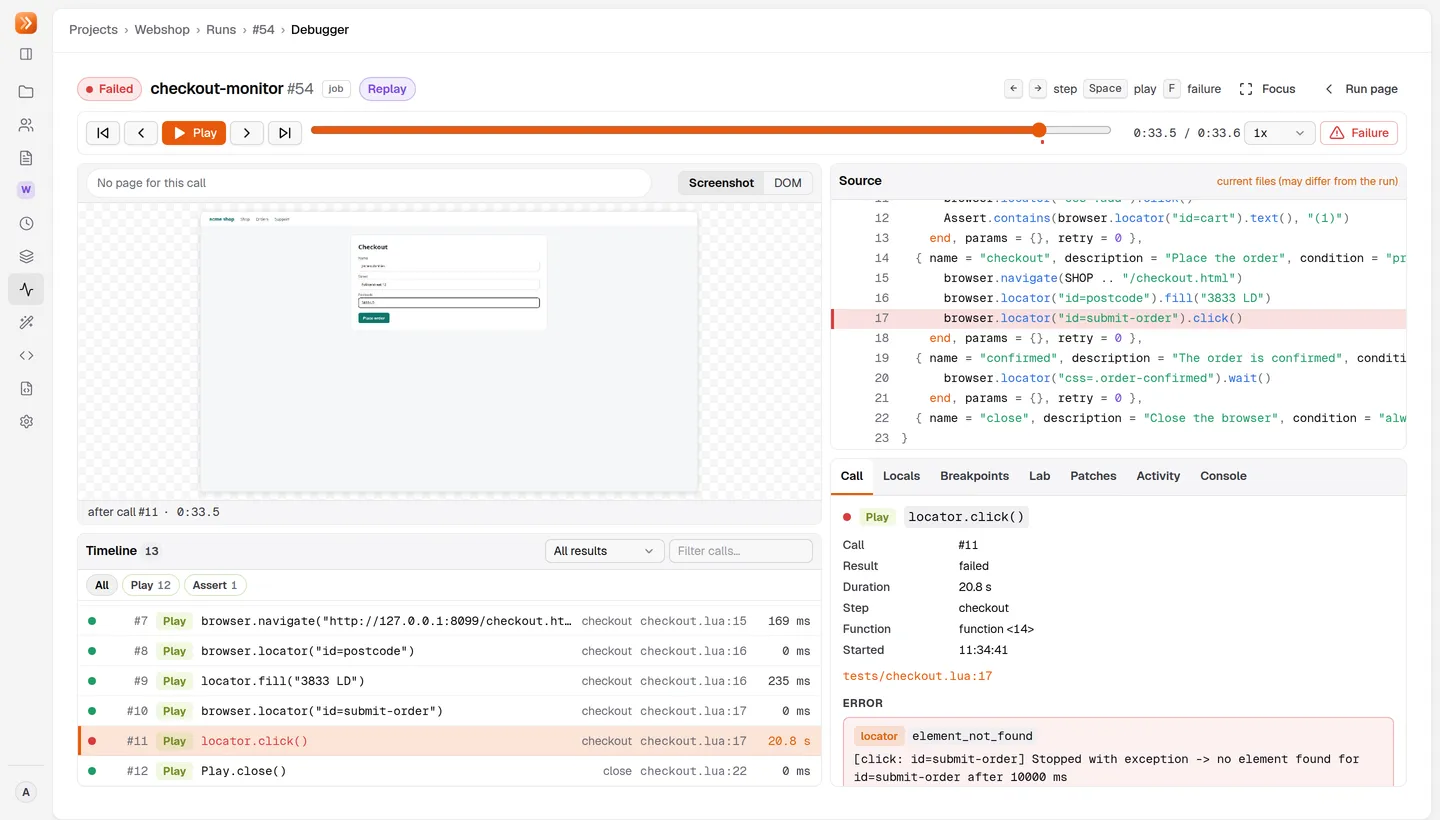
| Key | Action |
|---|---|
Left / Right | Previous or next call |
Space | Play or pause |
Home / End | First or last call |
F | Jump to the failure |
/ | Search |
DOM shows the saved page. In Lab, test a replacement selector on it without rerunning. Without an online project agent, CSS and XPath results are marked Approximate and visibility is unknown. A replay cannot evaluate variables or retry a call.
Choose what to record
Section titled “Choose what to record”Set replay in reflex.yaml, as a default or per job or suite. UI forms offer the same choices; they inherit the project default from Project Settings.
version: 1defaults: replay: on-failurejobs: nightly-orders: script: flows/orders.lua replay: always| Mode | What is kept |
|---|---|
off | No replay. |
on-failure (default) | The last 5 minutes of screenshots and DOM snapshots, plus the full call timeline. Kept only if the run fails, is lost, or passes with healing. |
always | Recordings for every run. A crashed agent leaves a partial replay. |
- Runs with a debugger attached record as
always. - Older page evidence rolls out after 300 seconds (
agent.replay.bufferSecondson the agent). Earlier calls stay in the timeline, but their page may be gone. - Recordings hold screenshots and DOM snapshots after browser calls, plus console and network events. The call timeline covers all libraries. It is not a video.
Retention
Section titled “Retention”| Run | Kept for |
|---|---|
| Failed, cancelled or lost | 30 days |
| Successful | 3 days |
| Dev and working-copy runs | 3 days |
Administrators can change replay.retention.failedDays, replay.retention.succeededDays and replay.retention.devDays. Deleting a run deletes its replay. Each owner has a storage quota (replay.quota.bytesPerOwner, 10 GiB by default).
If a replay is missing, the viewer says why. You cannot record it afterwards.
What is masked
Section titled “What is masked”- Password inputs and fields filled with
secret()are masked in DOM snapshots and blurred in screenshots. - Known secret values (including base64 and URL-encoded forms) become
***in text and DOM. - Credential headers and sensitive query parameters are masked. The network track has no bodies.
Other application data can still appear in a replay. Treat replays as project data.